Notes
Shutter angle is not sample count
I render browser animations to video by screenshotting the page at a high frame rate and averaging the frames back down with ffmpeg. I had the averaging wrong for months, in a way that still looked like motion blur.
Browser frames carry no motion blur at all. Every screenshot is an instant, so a straight export reads like stop motion next to the same animation playing live. The usual fix is to sample faster than you need and average groups of samples into each output frame, which puts a shutter back.
The recipe that gets copied around, and the one I used, is this:
render at 240fps, then -vf tmix=frames=4,fps=60That is a 360 degree shutter. Everything I shipped was exposed for twice as long as I meant.
The arithmetic
At 60fps an output frame occupies 16.67ms. A 180 degree shutter, the film default, exposes half of that: 8.33ms.
At 240fps the samples are 4.17ms apart. Four of them is 16.67ms, which is the whole output interval, which is 360 degrees. The next output frame starts where the last sample ended, so there is no gap anywhere. Nothing is ever still.
Two different things are hiding inside that one frames argument:
- Shutter angle is
frames / samplerate, expressed against the output interval. It sets how much of the frame you expose. - Sample count is
frames. It sets how many discrete images fill that exposure.
You cannot move one without moving the other, which is what makes the mistake stick.
The trap
The obvious correction at 240fps is tmix=frames=2. Half the samples, half the exposure, a genuine 180 degree shutter.
It looks worse. Two samples is not a streak, it is a double image. You fix the exposure and break the sampling in the same edit, and the sampling is the more visible of the two.
The fix
Raise the sample rate instead of lowering the frame count. Render at 480fps and keep frames=4. The samples are 2.08ms apart, four of them is 8.33ms, and you get a 180 degree shutter with four images in it instead of two. It costs exactly twice the screenshots and nothing else changes.
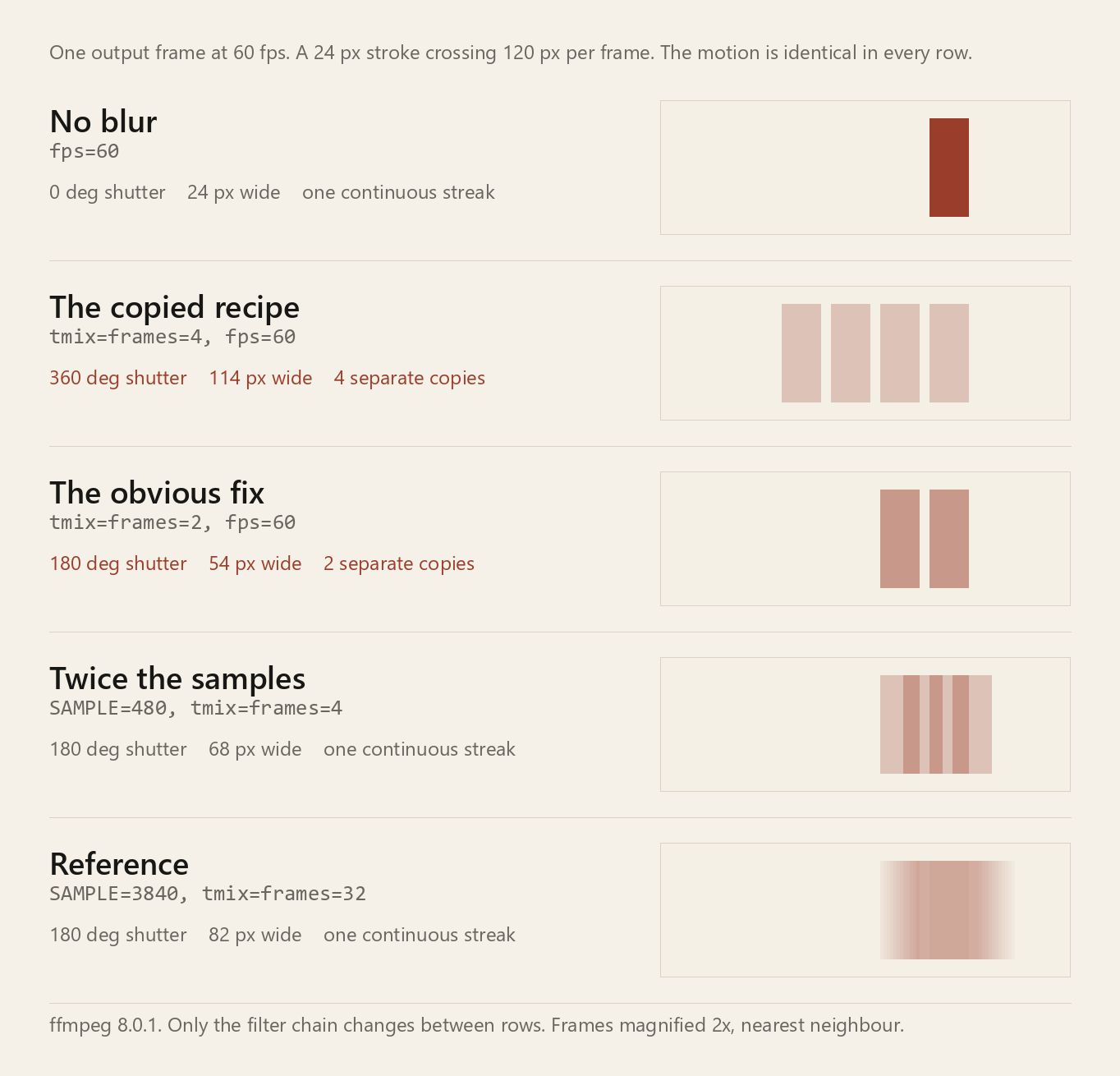
| filter chain | asked for | measured smear | reads as |
|---|---|---|---|
| fps=60 | 0 deg | 24 px | hard edge |
| 240fps, tmix=frames=4, fps=60 | 360 deg | 114 px | 4 separate copies |
| 240fps, tmix=frames=2, fps=60 | 180 deg | 54 px | 2 separate copies |
| 480fps, tmix=frames=4, fps=60 | 180 deg | 68 px | one streak |
| 3840fps, tmix=frames=32, fps=60 | 180 deg | 82 px | one streak |
| ideal continuous exposure | 180 deg | 84 px | reference |
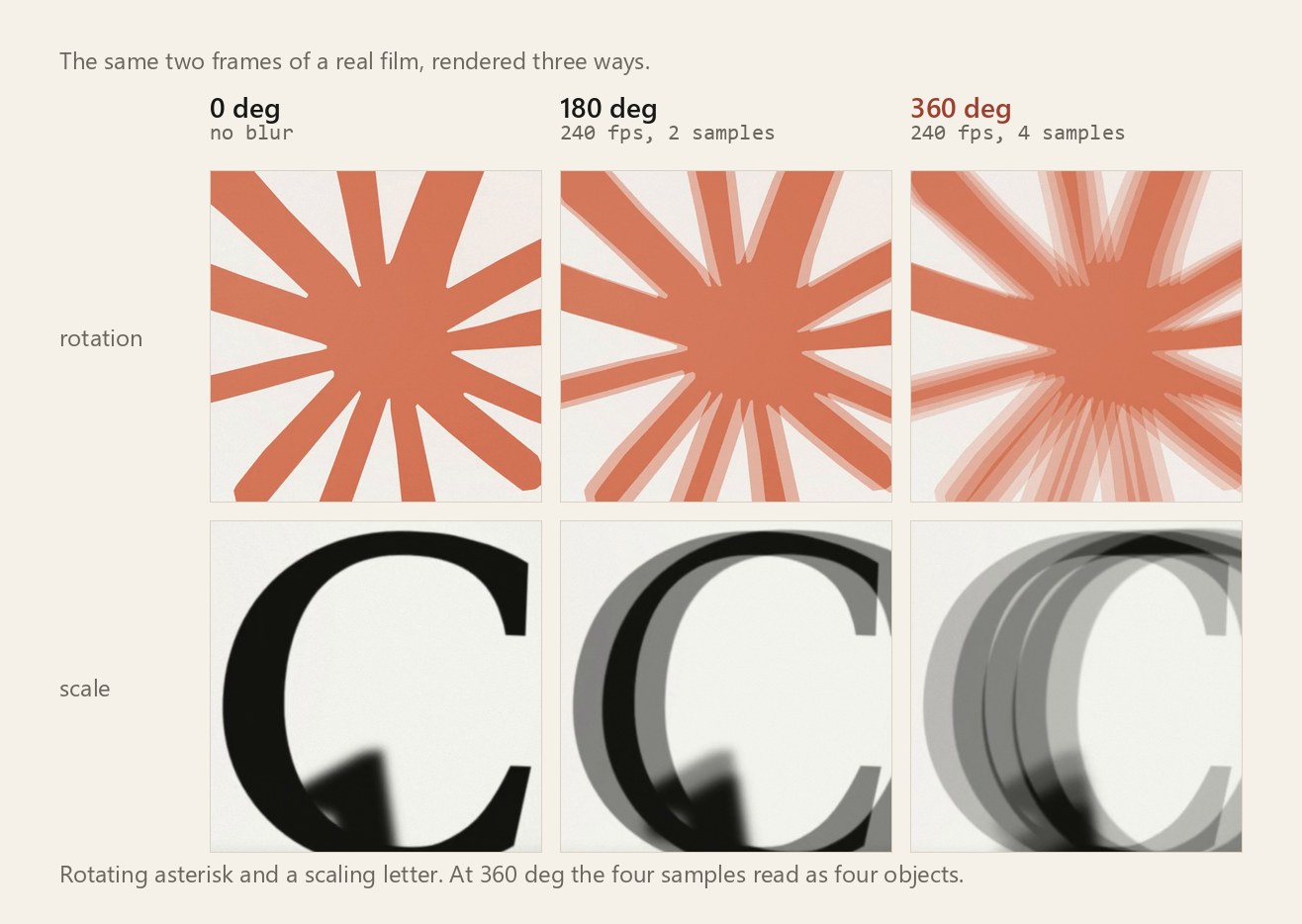
Here is the same three way comparison on real material, a rotating asterisk and a letter scaling up. At 360 degrees the four samples stop being a blur and start being four objects. Fast rotation gives you spokes, fast scale gives you nested outlines.
How many samples is enough
Four is still not many. The streak comes apart into separate copies as soon as the gap between samples is bigger than the thing that is moving. The gap is:
step = speed per output frame / samples per output frameMeasured against a solid stroke, the break point sits right at the stroke's own width along the direction of travel.
| stroke width | sample rate | holds together | comes apart |
|---|---|---|---|
| 8 px | 240fps | step 8 px | step 10 px |
| 8 px | 480fps | step 7.5 px | step 10 px |
| 24 px | 240fps | step 24 px | step 30 px |
| 24 px | 480fps | step 15 px | step 25 px |
So the rule is: keep the step under the width of whatever is moving. The step depends only on the sample rate, which means the thinnest fast thing in the shot decides how many screenshots the whole render needs.
At 120 px per frame and a 180 degree shutter, that 24 px stroke is fine at 480fps: four samples, step 15 px, one streak. Take the stroke down to 8 px and 480fps falls apart into four copies. It needs 960fps, eight samples, step 7.5 px. Sixteen screenshots per delivered frame is the real cost, and it is the reason four keeps getting used. Not because four is right.
The exposure is a little shorter than you asked for
frames / samplerate names the window you want, but tmix averages point samples, so the copies actually span frames - 1 gaps rather than frames. With a lot of samples the difference vanishes. With four it does not.
In the table above the ideal continuous 180 degree smear is 84 px. The dense 32 sample version lands on 82. Four samples at 480fps lands on 68, about 80 percent of the length. Two samples at 240fps lands on 54, which is not really a 180 degree shutter under any reading, it is a quarter of the interval with a hole in the middle of it.
If you are choosing a number from this, choose it by the step, not by the angle. The angle tells you what you meant. The step tells you what you get.
The filter order is load bearing
Both of these are valid ffmpeg and they are not the same thing:
-vf tmix=frames=4,fps=60      # average, then decimate
-vf fps=60,tmix=frames=4      # decimate, then average
The second one throws away three of every four samples first, then averages four surviving output frames. That is 66.7ms of exposure, a 1440 degree shutter, spread across four positions with clear gaps between them. Same stroke as above, same speed: 384 px wide, four copies. It is easy to write by accident because the filters read left to right in the order you think about them.
What the render script does now
The renderer takes a shutter angle and derives the frame count from it, instead of hardcoding four:
const SAMPLES_PER_OUT = SAMPLE / OUTFPS;

function tmixFor(deg) {
  const n = Math.round((deg / 360) * SAMPLES_PER_OUT);
  if (n < 2) return "";              // one sample is no blur at all
  return `tmix=frames=${n}:weights='${Array(n).fill("1").join(" ")}',`;
}
The important part is that the angle and the sample rate are now separate knobs, so you have to pick the sample rate on purpose. A 180 degree shutter at SAMPLE=240 gives you two samples and the double image. The same 180 degrees at SAMPLE=480 gives you four. 360 is still reachable by name, because every master rendered before this was made that way and I would rather reproduce an old render than pretend it never happened.
Reproducing this
Nothing here needs a browser. A solid rectangle moving at a known speed is enough, and it makes the smear directly measurable in pixels.
# 240fps source: a 24px stroke crossing 7200 px/sec, which is 120 px per 60fps frame
ffmpeg -f lavfi -i "color=c=black:s=1400x160:r=240:d=0.6" \
       -f lavfi -i "color=c=white:s=24x60:r=240:d=0.6" \
       -filter_complex "[0][1]overlay=x=t*7200:y=50" -c:v ffv1 src240.mkv

# the copied recipe: 360 degrees
ffmpeg -i src240.mkv -vf "tmix=frames=4:weights='1 1 1 1',fps=60" -c:v ffv1 a.mkv

# same shutter, twice the samples: render the source at 480 and keep frames=4
Then pull a single frame out of each and count the lit pixels across one scanline. Measuring the run length is the whole test, and it is the part that told me the exposure was double, which no amount of looking at it had done.